Help

Connecting Stripe

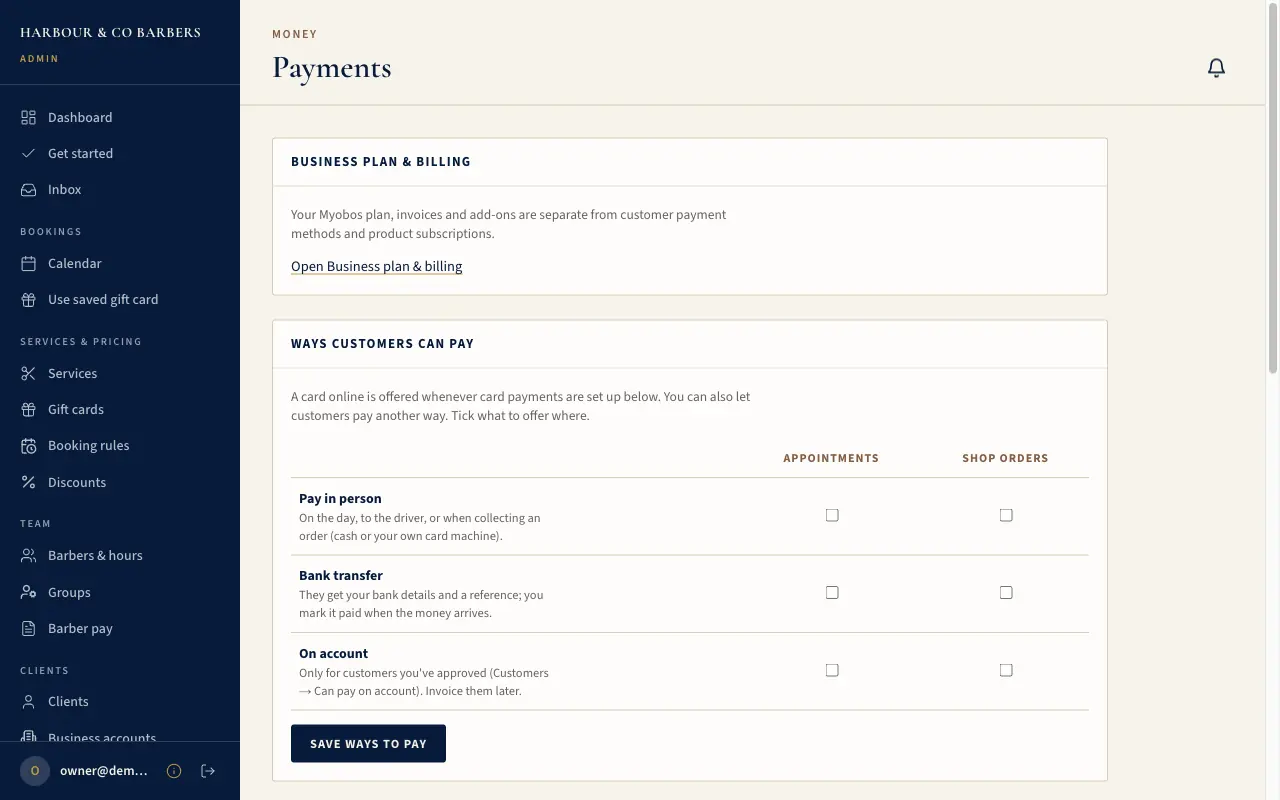
Ways customers can pay at Harbour & Co Barbers
Ways customers can pay at Harbour & Co Barbers, a made-up business set up on Myobos.

Open Payments and start Stripe's onboarding. Stripe asks for your business and bank details on its own pages. When it's finished, deposits, checkout, invoices and refunds run on your own Stripe account. Your Stripe dashboard is available inside the admin.

Under Ways customers can pay, you can also offer:

  • bank transfer, with your details shown to the customer
  • cash or card in person
  • paying on account.

If your plan takes card payments through Myobos, 0.5% comes off each card payment. Stripe's own fees are separate.

Not ready for card payments yet? Bank transfer, cash and paying on account work without Stripe, and you can connect it later.

Refunds go back through Stripe from the admin. Payouts reach the bank account you gave Stripe, on Stripe's own schedule.

Next: Adding your own domain →

More guides

Start free. No card.

7 days on your free address to build and check everything behind a holding page. Nothing goes public until you press Go live.

What kind of business is it?

Your starting services and pages are set up to match. You can change them later.

Choose your web address

Every site gets a free address. You can add your own domain too.

About you

You’ll be the owner. This email is how you sign in.

Check and confirm

Nothing is charged for the trial. You can cancel any time before you go live.

Check your email

We’ve sent you a link to confirm your email and continue setting up.

Not there? Check your junk folder, or .

Sign in

You sign in on your own site. Enter its address and we’ll take you to its admin.